Ace Combat 8 supports flight-stick play, but it does not offer confirmed universal native support for every existing HOTAS, throttle, or pedal set. The product documentation confirms two licensed controller families for PlayStation and PC: the Thrustmaster T.FLIGHT HOTAS NEO ACE COMBAT 8 Edition and the HORI ACE COMBAT 8 Flight Stick. Support for generic or older hardware is less predictable, and the developer has acknowledged that some configuration options present in Ace Combat 7 are missing on PC.
If you already own an unsupported PC setup, your practical choices are to try a virtual-gamepad mapping or use the unofficial AC8HOTAS mod in offline single-player. The mod supports separate sticks, throttles, and rudder pedals. Follow the current author’s package instructions and keep mod tests out of multiplayer.
If a loader or mapping change affects game startup, consult PC crash troubleshooting and the mod installation and rollback guide before adding more tools.
Version scope — October 7, 2026: This page was edited from supplied research. No numbered game build or independent playtest is recorded for this guide. Tool compatibility follows the linked author’s release notes, not a test by this site.
Current HOTAS support at a glance
| Platform and hardware | Documented support | Important limitation |
|---|---|---|
| Thrustmaster T.FLIGHT HOTAS NEO ACE COMBAT 8 Edition on PS5 or PC | Officially licensed, plug-and-play, with an optimized game mapping | Vibration is documented only for PS5 and PC |
| HORI ACE COMBAT 8 Flight Stick on PS5 or Windows PC | Officially licensed and designed around Ace Combat controls | It is a single flight stick with small throttle and brake levers, not a conventional split HOTAS |
| Generic or older PC stick, throttle, and pedals | No blanket native-compatibility guarantee is established | May require an unofficial mod or controller emulation |
| Generic hardware on Xbox Series X|S | No confirmed compatibility list is present in the current information | Do not assume an older Xbox HOTAS will work because it worked in another game |
| Generic hardware on PlayStation 5 | No general workaround comparable to the PC mod is documented | The safest purchase is hardware explicitly listing the required console and game compatibility |
The licensed controllers also list PlayStation 4 compatibility, but that describes the hardware, not an Ace Combat 8 release for PS4. The verified game platforms are PlayStation 5, Xbox Series X|S, and PC.
Officially documented flight controls
Thrustmaster T.FLIGHT HOTAS NEO ACE COMBAT 8 Edition
This is the clearest documented option for a traditional stick-and-throttle layout. Its throttle can remain attached for lap or compact use or be separated for a desk setup. The manufacturer lists seven control axes, 16 action buttons, a mini-stick, a hat switch, a rapid-fire trigger, adjustable stick resistance, and two rudder-control choices: twisting the stick or using the lever on the throttle.
The mapping includes a dedicated High-G control. Built-in vibration can represent weapons, acceleration, and damage effects, although the manufacturer limits that feature to PS5 and PC. Because it is sold in platform-specific variants, verify the platform printed on the exact unit before buying; a similar product name is not enough to establish console compatibility.
On PC, install any required manufacturer software before treating a failed first connection as a game problem. One owner reported that Windows did not detect the controller correctly until its drivers were installed. That is an individual report rather than a universal requirement, but checking drivers is a low-risk first step.
HORI ACE COMBAT 8 Flight Stick
HORI’s licensed controller uses an ambidextrous single-stick design with Hall-effect sensors, a twist axis, independent throttle and brake levers on the base, and a dedicated High-G button. Eight function buttons can be reassigned with the companion configuration support described by HORI. Its PC companion app is documented for Windows 11.
This controller can link to a second matching unit for twin-stick operation, but one retail package contains only one stick. Buying two is therefore a deliberate twin-stick choice, not a requirement for ordinary Ace Combat 8 flight-stick control. Players specifically seeking a conventional left-hand throttle should compare the physical layout carefully rather than assuming that every licensed “flight stick” is a split HOTAS.
Test a licensed controller before changing software
Use a short, reversible test before installing mapping tools or mods:
- Confirm that the exact controller variant lists your platform.
- Connect the controller before launching the game. On PC, verify that Windows sees its axes and buttons first.
- Start Ace Combat 8 and select Expert flight controls when you want separate roll and pitch behavior.
- Test pitch, roll, throttle, yaw, target selection, weapons, camera control, pause, and menu navigation individually.
- Note whether an input is absent, reversed, stuck at an extreme, or behaving like a button instead of an analog axis.
- Keep a standard controller or keyboard available during the first test. Community reports describe some setups that could fly but still needed a controller for other functions.
A partially working device is not the same as complete native support. Record which controls actually respond before remapping anything; otherwise, native and emulated inputs can become difficult to distinguish.
Using separate or unsupported HOTAS hardware on PC
Offline AC8HOTAS mod route
Use the AC8HOTAS author repository and full-package installation guide. The documentation checked on October 7, 2026 identifies AC8HOTAS 0.2.0 with optional AC8AnalogYaw 0.1.3. The full package is for a fresh setup without an existing loader; an existing UE4SS installation needs the mod-only route. This guide does not certify either package against your current game build.
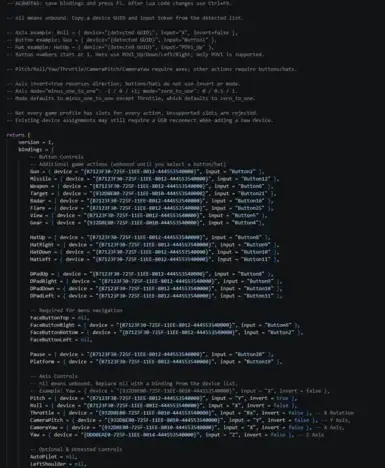
Example Bindings.lua configuration for mapping unsupported flight controls.
The unofficial AC8HOTAS mod binds physical controllers to existing Ace Combat 8 actions. It supports multiple devices, so a stick, separate throttle, and rudder pedals do not have to be merged into one virtual controller. Its configuration covers pitch, roll, yaw, throttle, camera axes, buttons, axis inversion, input ranges, and the first POV hat. The optional AC8AnalogYaw component provides proportional yaw rather than treating yaw as a simple digital press.
This route is for Windows x64 offline single-player. Use the current author’s launch requirements rather than assuming all releases need the same alternate-launch or anti-cheat setup. Do not carry a modded loader into ACE COMBAT ONLINE.
- Close the game and connect the intended flight hardware.
- If you do not already use UE4SS, install the mod’s full package by copying its included
Gamefolder into the Ace Combat 8 installation folder. - If UE4SS is already installed, use the mod-only package and add its folders to the active UE4SS
Modsdirectory instead of replacing the whole loader configuration. - Enable AC8HOTAS and, if wanted, AC8AnalogYaw in the existing mod list.
- Follow the linked package’s current launch instructions; do not import an alternate launch option from an older package or another mod.
- Launch through Steam, choose Expert flight controls, and open
Game/Binaries/Win64/UE4SS/Mods/AC8HOTAS/bindings.lua. - Use the detected-device list at the bottom of that file to identify the available axes, buttons, and hats.
- Assign the inputs, save the file, and press F5 in game to reload the bindings without restarting.
All mod controls begin unbound. Back up bindings.lua before updating the mod so your mapping is not lost.
Reading the detected-device list
Map one control at a time, beginning with pitch and roll. Then add throttle, yaw, weapons, targeting, camera, and menu functions. If an axis moves in the wrong direction, use the configuration’s inversion option rather than physically reversing the control. If a newly assigned device is not recognized, the mod documentation recommends reconnecting its USB cable before assuming the binding name is wrong.
The documented limitations matter for complex cockpits. Two devices sharing the same product ID cannot be mapped separately, only the first POV hat is supported, and some listed actions depend on the current game context or native profile slots. Not every action in the configuration has been tested by the mod author.
To return to a clean launch, close the game and disable or remove the UE4SS loader using its documented removal path. Restore any launch settings you actually changed; do not assume this package added an offline launch option. Disabling only the HOTAS module is insufficient if UE4SS remains loaded.
Virtual-gamepad mapping as an alternative
Community users also report mapping a joystick through Steam Input or tools that present the hardware as a virtual gamepad. One captured demonstration uses x360ce with its virtual-controller dependency, then assigns physical axes and buttons to gamepad inputs.
Treat this as a fallback, not guaranteed native HOTAS support. A virtual gamepad can inherit gamepad dead zones, convert an analog control into a digital action, or leave some interface functions unmapped. Test small stick movements, centered throttle behavior, and yaw response before committing to a long mission. Never copy another player’s dead-zone value without testing your own hardware.
Common HOTAS problems and fixes
- The stick is absent in the game: Confirm operating-system detection, install the manufacturer’s current driver if required, reconnect before launch, and test without an unpowered USB hub.
- Pitch or roll is reversed: Invert only the affected axis in the mapping layer. Do not swap unrelated action names.
- Throttle starts at maximum or runs backward: Reverse the throttle axis and confirm its full physical travel reaches both ends of the virtual range.
- Yaw behaves like an on-off button: Native or emulated mapping may be using digital yaw. On the offline mod route, use the proportional analog-yaw component described by the mod.
- A hat switch does nothing: The AC8HOTAS documentation supports only the first POV hat. Map essential target or camera actions there and move secondary functions to buttons.
- Two identical devices cannot be separated: The mod cannot distinguish devices that share the same product ID. Use different hardware or a carefully tested virtual-device layer.
- The controller flies but menus do not respond: Keep a keyboard or gamepad available and bind the missing interface actions separately where the chosen method permits it.
- A game update breaks the setup: Remove the unofficial loader, return to the protected default launch, and verify ordinary game operation before rebuilding the mod configuration.
For console players, the reliable path is an explicitly compatible licensed controller. For PC players, licensed hardware offers the simplest setup, while AC8HOTAS is the more flexible option for an existing multi-device cockpit—provided it stays offline and its anti-cheat restrictions are respected.