ACE COMBAT 8 error ST-3100001 means ACE COMBAT ONLINE lost communication with the game server. The official first step for Windows players is to check for a clock discrepancy, synchronize Windows time, and test Online again. Do that before changing game files, network settings, or hardware. If the error remains, there is no universal fix confirmed in the current information; use the controlled tests below to identify whether the failure is general, tied to the first Online load, or associated with one aircraft setup.
Do not treat a temporary successful connection as proof that a workaround permanently fixed the problem. Community results are mixed, including reports from players for whom time synchronization or a single-player preload did nothing.
Confirm the Online mode and progression you are entering. If the game closes instead of losing server communication, use PC crash troubleshooting.
Version scope — October 7, 2026: This page was edited from supplied research. No numbered game build or independent playtest is recorded for this guide. Check the current in-game descriptions and your platform before applying build-sensitive conditions.
What ST-3100001 means
The confirmed meaning is narrow: communication with the game server was lost while playing ACE COMBAT ONLINE, so the game could not continue. The code does not, by itself, identify why communication failed. It also does not prove that your account is banned, that your installation is corrupt, or that a specific network component is responsible.
Keep the exact code visible when diagnosing the problem. Player reports mention several similar-looking codes, but their causes and remedies are not established as interchangeable. A step suggested for ST-3100001 should therefore be judged only against a new ST-3100001 attempt. If the next failure displays a different code, record it separately rather than assuming the first procedure failed in the same way.
The point at which the code appears is useful evidence. Note whether it happens before matchmaking, after a lobby forms, after aircraft selection, during the mission loading screen, or after play begins. Several community reports place ST-3100001 around mission loading, but that pattern is not universal and does not establish a single cause.
Apply the official Windows time-sync fix
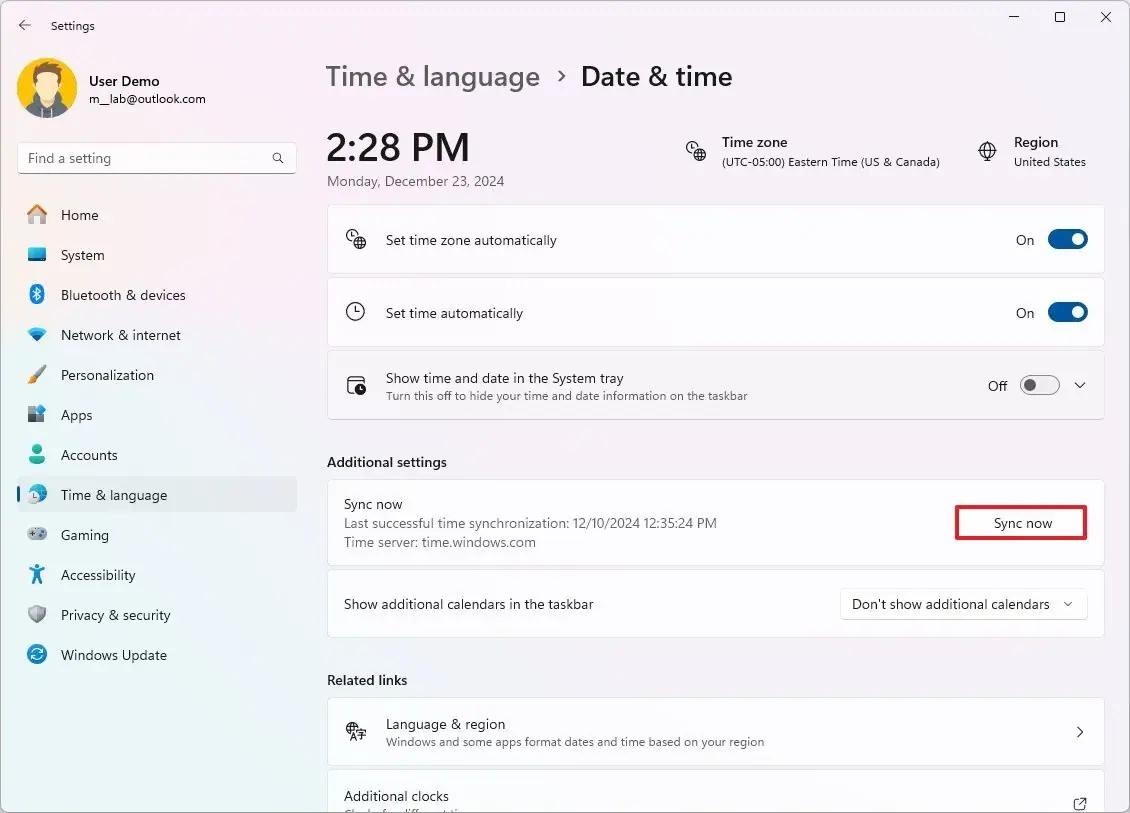
The Windows clock synchronization controls referenced in the official troubleshooting step.
This is the only specific remedy in the official notice. It applies to Windows; the notice does not provide an equivalent console procedure.
- Close the current Online attempt so you are not repeatedly entering and leaving matches while changing settings.
- Open Windows Settings and go to the date and time controls.
- Confirm that the displayed date, time, and time zone are correct for your location.
- Enable automatic time synchronization if it is disabled, then use the available option to synchronize the clock.
- Wait for Windows to report that synchronization completed. Exact labels can vary by Windows configuration.
- Relaunch ACE COMBAT 8, enter ACE COMBAT ONLINE, and make one controlled attempt to join the activity that previously failed.
Changing only the clock setting before this test matters. If you simultaneously reinstall the game, change DNS, remove aircraft cosmetics, and load a campaign mission, a successful attempt will not tell you which change mattered.
If Online works, complete a normal test rather than declaring success as soon as the lobby opens. Player reports show that some failures occur after aircraft selection or during mission loading. The useful end state is reaching and remaining in the mission, not merely entering the Online hub or matchmaking queue.
If ST-3100001 returns, verify the Windows clock did not drift back and that the intended time zone remained selected. Then move on. Repeating the same sync-and-queue loop many times without a changed condition produces little diagnostic value.
Run one clean retest
A clean retest separates the official fix from random variation. Before entering the queue, write down four facts: the platform, selected Online activity, selected aircraft configuration, and exact stage of the previous failure. Keep those four conditions unchanged for the first post-sync attempt.
During the attempt, record the furthest point reached:
- Online mode could not be entered.
- Matchmaking started but no lobby formed.
- A lobby formed, then the attempt failed before aircraft selection.
- Aircraft selection completed, then ST-3100001 appeared during loading.
- The mission began, then communication was lost.
This does not reveal the root cause, but it turns a vague “Online does not work” report into a reproducible sequence. It also prevents a lobby visit from being mistaken for a successful match connection.
If the code appears, save a screenshot that includes the full error text and note the local date and time. A screenshot of the code is more useful than a paraphrase, especially when several ST codes are being discussed. Record the installed client version if it is available. The date a screenshot was taken does not identify the game build.
Test the limited community workarounds in order
The following steps come from individual player reports and a video demonstration, not from a confirmed universal fix. Try them only after the official clock synchronization step, one at a time, and keep expectations modest.
Preload a single-player activity before Online
Some players reported that loading a campaign mission, free flight, or a tutorial before returning to Online allowed a later connection. Other players tried a story mission after synchronizing time and still received the error. That makes preloading a diagnostic workaround, not a guarantee.
- Start ACE COMBAT 8 fresh after the time-sync test.
- Load one available single-player activity completely.
- Confirm that you have actually reached the playable activity rather than only its selection menu.
- Exit normally to the menu.
- Enter Online and repeat the same mode and aircraft test once.
One video used a tutorial, while a separate player report said free flight was sufficient. The evidence does not establish that a particular tutorial or mission is required. The plausible value of this test is simply to compare a direct-to-Online launch with a launch after game assets have already loaded; it does not prove why a later attempt succeeds.
If the same error returns at the same stage, record the result and stop repeating this branch. Loading different campaign missions over and over is not supported as a stronger fix.
Isolate the selected aircraft configuration
A community report described one aircraft selection repeatedly failing while another aircraft could enter a mission. That player then changed the troubled aircraft's skin, removed emblems, and changed its favorite status. Another commenter reported getting further without skins or emblems but later encountered other connection codes. These are isolated observations, not an official explanation.
Use this as a controlled comparison:
- Keep the Online activity and all external settings unchanged.
- Select a different aircraft with a simple configuration.
- Attempt to load the activity once.
- If the alternate aircraft succeeds, return to the original aircraft and change only one visible configuration element at a time, such as its skin, emblems, or favorite status.
- Retest after each single change and write down the result.
Do not conclude that cosmetics cause ST-3100001 from one successful match. The connection may have recovered independently. A repeatable difference between two aircraft setups is useful support evidence, but it still is not a universal rule.
Avoid promoting unproven fixes
Players have reported trying file verification, reinstallation, firewall allowances, administrator mode, closing overlays, changing DNS, and reinstalling anti-cheat files without solving ST-3100001. Those reports do not prove that every one of these actions is useless, but they also do not support presenting them as verified fixes for this exact code.
For the same reason, do not import crash remedies from ACE COMBAT 8 startup or UE error guides. ST-3100001 is an Online communication error, not a confirmed graphics, shader, or startup crash. Mixing those paths increases effort without improving the evidence.
Stop rapid retries when warnings appear
Several community posts describe disconnections being counted like early match departures and mention temporary Online restrictions after repeated failures. The current information does not establish a fixed threshold, duration, or rule, so no exact penalty can be promised or predicted.
Use a cautious rule: if the game displays a warning, caution state, or restriction related to leaving, stop queueing. Preserve a screenshot and wait rather than testing the same failing sequence continuously. Do not modify game files or attempt to bypass an account restriction.
Even without a warning, repeated identical attempts are low-value. After one post-sync retest, one single-player preload comparison, and one alternate-aircraft comparison, you have covered the supported local branches. More retries under unchanged conditions are unlikely to reveal which factor is responsible.
Build a useful support report
If the official step and the limited comparisons fail, prepare a concise report rather than sending “ST-3100001 does not work.” Include only observations you actually made.
| Field | What to record |
|---|---|
| Platform | PC, PlayStation 5, or Xbox Series X or S |
| Exact code | ST-3100001, copied or captured exactly |
| Failure stage | Before lobby, after matchmaking, after aircraft selection, during loading, or after mission start |
| Online activity | The activity selected when the failure occurred |
| Windows clock check | Whether date, time, time zone, and synchronization were checked |
| Reproduction | Whether the same stage failed again in one controlled retest |
| Single-player comparison | Whether a fully loaded single-player activity changed the next result |
| Aircraft comparison | Whether a different, simply configured aircraft changed the result |
| Other code | Any different code shown on a later attempt, kept separate |
| Warning or restriction | Exact on-screen wording and when it appeared |
Add the local date and time of the attempt, but do not label that timestamp as a client version. If the game or platform shows a real build identifier, record it exactly; otherwise state that the patch number is unknown.
A strong reproduction summary is short: “Windows clock synchronized; Online activity selected; lobby formed; ST-3100001 appeared after aircraft selection during loading; same result on one retest; single-player preload did not change it.” Replace each clause with your actual result. This gives support a sequence they can compare without turning community theories into facts.
The practical stopping point
You have exhausted the evidence-backed local path when Windows time is correct and synchronized, a controlled Online retest still produces ST-3100001, and the two limited community comparisons do not change the outcome. At that point, the available information does not justify another guaranteed client-side fix.
Keep campaign and Online issues separate. Being able to play single-player does not prove the Online connection is healthy, while reaching the Online hub does not prove a mission connection will hold. Likewise, a different ST code is a new observation, not confirmation that ST-3100001 changed meaning.
The safest conclusion is specific: your system still loses communication during ACE COMBAT ONLINE under the recorded conditions. Preserve the evidence, avoid an unchanged retry loop, and use official support or a later verified notice to reassess the issue.